


Find support for your seating and workplace products.




Need Additional Support?
The DBI team is here to help you with adjustments and other support requests.
💬 Contact Us →
CHAIRS
HAWORTH

Zody II – Adjustment Videos
Instructions on how to adjust your Zody II chair to fit you and the way you work.
Height Adjustable Tables
Haworth
Upside Non Programmable – Adjustment Videos
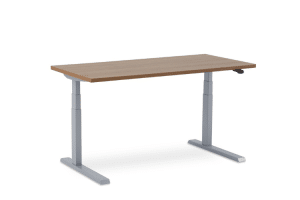
Instructions on how to reset and troubleshoot your Upside Non Programmable Paddle Table.
Master Series – Adjustment Videos
Height Adjustable Table Troubleshooting Tips
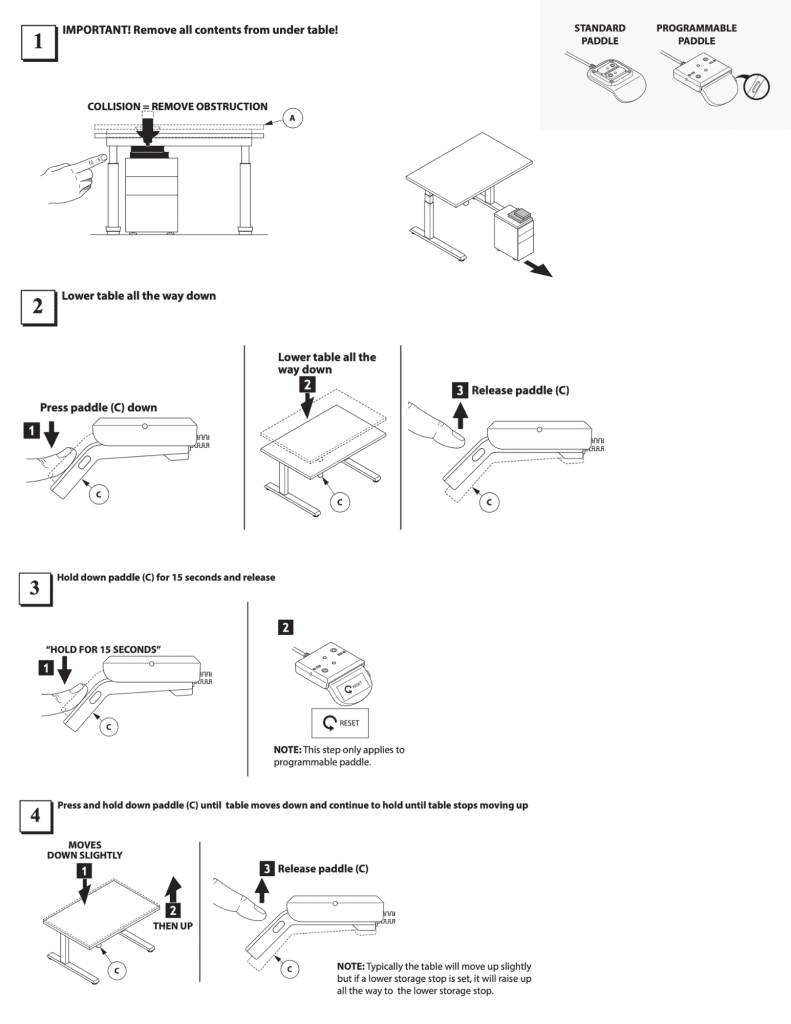
Step 1: Remove all contents from under the table. !IMPORTANT!
Step 2: Lower the table all the way down.
Step 3: Hold down the paddle for 15 seconds and release.
Step 4: Press and hold down the paddle until the table moves down, and continue to hold until the table stops moving up.
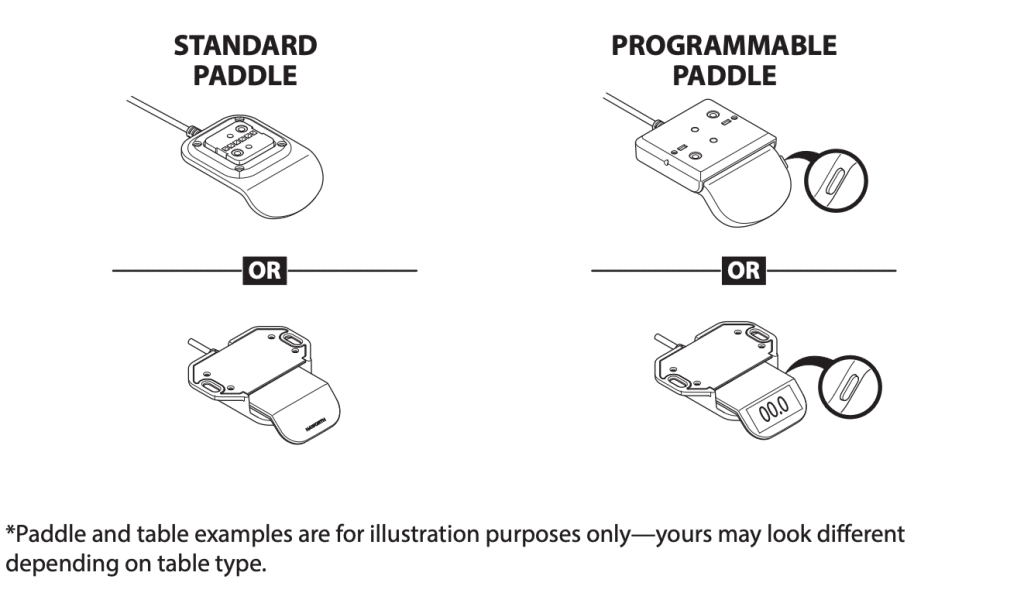
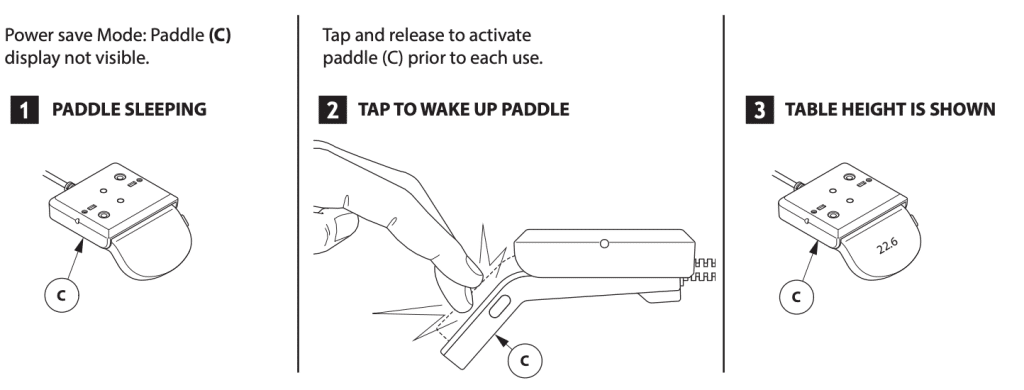
If your height adjustable table paddle is sleeping (aka Power Save Mode), table the paddle to wake it up. Power Save Mode only impacts programmable paddles.
Paddle (C) enters a power-save mode after 10 seconds of inactivity.
Prior to each use, user must “TAP AND RELEASE” paddle (C) or “TAP AND RELEASE” the menu button (C3) to activate the paddle (C).
STEP 1: Raise table to desired standing height (above 35.5 inches)
STEP 2: Tap paddle up until “Favorite” menu is displayed
STEP 3: Press Button (C3)
STEP 4: Press Button (C3) again to “Preset Height 1”. The heart will fill in with the preset height.

STEP 1: Raise table to desired standing height (above 35.5 inches)
STEP 2: Tap paddle up until “Favorite” menu is displayed
STEP 3: Press Button (C3)
STEP 4: Press Button (C3) again to “Preset Height 1”. The heart will fill in with the preset height.
STEP 1: Lower to Preset Height 1. Tap paddle (C) down 2 times rapidly.
STEP 2: Lower to Preset Height 2. Tap paddle (C) down 2 times rapidly.
STEP 3: Raise back to Preset Height 1 (42”)

NOTE:
- If table height is ABOVE 40”, the bar will not fill, and the paddle WILL NOT vibrate.
- If table height is BELOW 40”, the bar begins to fill as each minute passes. When the bar is full it will vibrate.
STEP 1: Press button (C3)
STEP 2: Table paddle (C) up until the “REMINDER” menu is displayed
STEP 3: Press button (C3)
STEP 4: Table paddle (C) up until the desired reminder is displayed.
STEP 5: Press button (C3)

STEP 1: When the time on the reminder bar is full the paddle will vibrate and display the above image.
STEP 2: Raise table above 40″ to reset the move reminder.
STEP 3: Lower table height BELOW 40”, and the bar begins lling again.

STEP 1: Press button (C3)
STEP 2: Tap paddle (C) up until the “REMINDER” menu is displayed
STEP 3: Press button (C3)
STEP 4: Tap paddle (C) up until the “turn o reminder” is displayed
STEP 5: Press button (C3)

STEP 1: Press paddle (C) up.
STEP 2: Raise table to desired upper storage stop height
STEP 3: Press button (C3)
STEP 4: Tap paddle (C) up until “Limits” is displayed
STEP 5: Press button (C3)
STEP 6: Tap paddle (C) up until the “UPPER STORAGE STOP” page is displayed
STEP 7: Press button (C3) to set upper storage stop height

STEP 1: Press paddle (C) down
STEP 2: Lower table to desired lower storage stop height
STEP 3: Press button (C3)
STEP 4: Tap paddle (C) up until “Limits” is displayed
STEP 5: Press button (C3)

STEP 1:Press button (C3)
STEP 2: Tap paddle (C) up until the “LIMITS” menu is displayed
STEP 3: Press button (C3)
STEP 4: Press paddle (C) down until the “CLEAR UPPER AND LOWER STORAGE STOP” page is displayed
STEP 5: Press button (C3) to clear upper and lower storage stop height

STEP 1:Press button (C3)
STEP 2: Tap paddle (C) up until “LOCK” menu is displayed
STEP 3: Press button (C3)
STEP 4: Tap paddle (C) up until “LOCK” is displayed
STEP 5: Press button (C3) to set lock on paddle automatically after 10 seconds of inactivity

STEP 1:Press button (C3)
STEP 2: Tap paddle (C) up until “LOCK” menu is displayed
STEP 3: Press button (C3)
STEP 4: Tap paddle (C) up until “UNLOCK” is displayed
STEP 5: Press button (C3)

STEP 1:Press button (C3)
STEP 2: Tap paddle (C) up until “MANUAL” menu is displayed
STEP 3: Press button (C3)

STEP 1:Press button (C3)
STEP 2: Tap paddle (C) up until “VIBRATION” menu is displayed
STEP 3: Press button (C3)
STEP 4: Tap paddle (C) up until desired “VIBRATION PATTERN” is displayed
STEP 5: Press button (C3)

STEP 1:Press button (C3)
STEP 2: Tap paddle (C) up until “VIBRATION” menu is displayed
STEP 3: Press button (C3)
STEP 4: Tap paddle (C) up until desired “TURN OFF VIBRATION PATTERN” is displayed
STEP 5: Press button (C3)

STEP 1: Press paddle (C) down
STEP 2: Lower table all the way down
STEP 3: Release paddle (C)
STEP 4: Hold down paddle (C) for 15 seconds and release paddle (C)
STEP 5: Lift paddle (C) and hold until a number is displayed. NOTE: Repeat this step until desired sensitivity is displayed.
STEP 6: Press paddle (C) down and hold until table 4 reset is complete

HushFree Acoustic Booth
Haworth

HushFree Control Panel
Hushoffice acoustic pods come in a variety of sizes and configurations. Regardless of the configuration style you have in your office, the control panel is the same for each model.
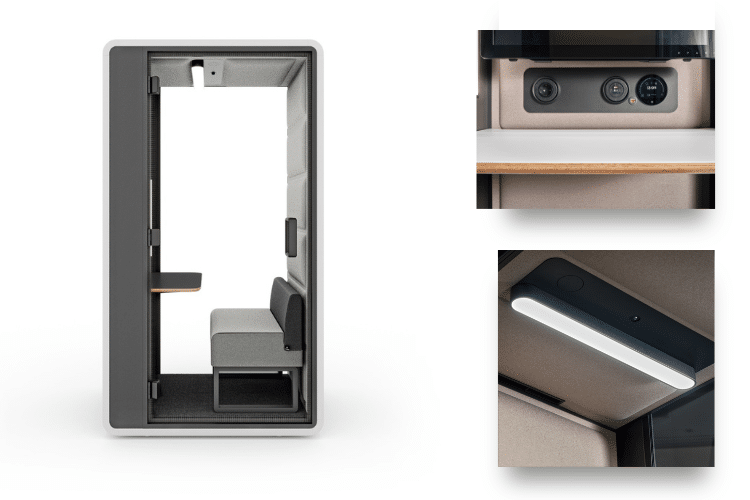
Hushfree.S.Hybrid
Hushfree S Hybrid makes hybrid work more private, comfortable, and connected.. Its compact acoustic construction supports speech privacy for video meetings, phone calls, and focused tasks, while ergonomic interior planning and smart controls create a better single-user experience. Mounted casters allow the pod to be relocated as needs change, and the optional VESA monitor mount supports a more natural video call setup. It’s a focused, technology-ready acoustic pod that brings privacy and performance to the daily rhythm of hybrid work.
Workstation Tools
Haworth

Haworth Pixo Light
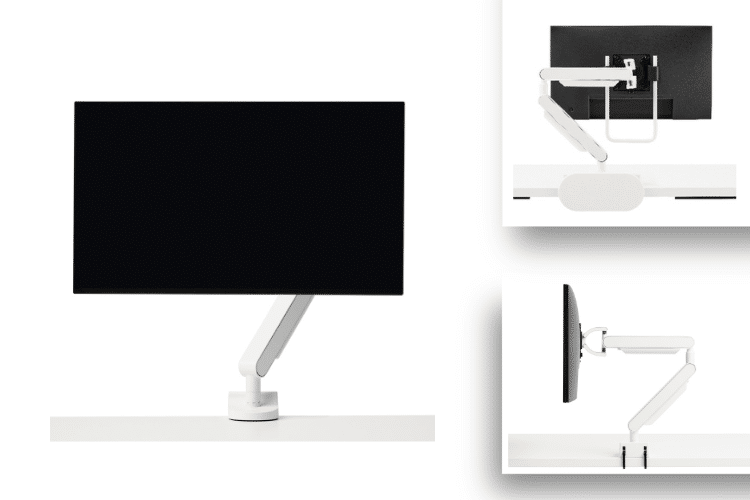
Belong Monitor Arm – Adjustment Videos
Instructions on how to adjust your Belong Monitor Arm.

Adjustment Videos
Instructions on how to adjust your Belong Power Module.
Ergonomic Best Practices
Ergonomic Articles & Guides
>> Improve Worplace Ergonomics
>> Ergonomics That Work: Designing for Every Body
The most important ergonomic best practice is making sure your workspace can adjust to you. Backed by our partnership with Haworth, DBI believes the best ergonomic setup is one that supports your body, your posture, and the way you work throughout the day. That means your chair, desk height, and monitor position should be adjustable so you can sit or stand comfortably, reduce strain, and stay better supported as your tasks change.

 Your monitor should be positioned about an arm’s length away and at a height that allows your head and neck to stay in a natural, upright position. The goal is to keep your screen where you can view it comfortably without leaning forward, tilting your head, or straining your eyes. Small adjustments to monitor height, distance, and support can make a meaningful difference in daily comfort and focus, especially over longer periods of computer work.

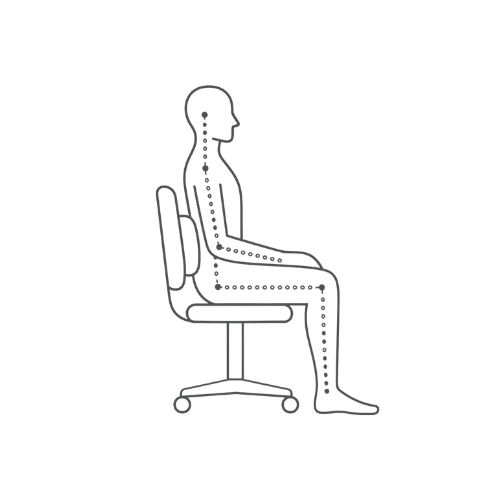
 The best seated posture for lower-body support keeps your hips and legs in a comfortable, supported position. A good starting point is to sit with your torso and thighs at about a 90-degree angle, or slightly more open, with your feet resting flat on the floor or on a footrest. Your seat depth matters, too. If the seat is too deep or too shallow, it can create pressure behind your knees or under your thighs, making it harder to stay comfortable throughout the day.
 Yes, sit-to-stand working can be a best practice when it is used in moderation. The goal is not to stand all day, but to create more opportunities to change positions throughout the workday. Height-adjustable desks can support that by making it easier to alternate between sitting and standing.
We recommend starting with short standing periods, especially around 15 minutes or less, and increasing that time gradually based on comfort.
Facilities & Product Care
Product Care Guides
- No material is immune to stains or soiling.
- Lack of cleaning or improper cleaning will shorten the life span of items such as fabrics, faux leathers, and leather.
- Treatments such as Nano-Tex® do not eliminate the need for routine cleaning and proper maintenance.
- The Longer a stain remains on any surface, the more difficult it will be to remove. Address any stain as quickly as possible.
- Removing any cleaning residue is an important part of the cleaning process, and one that is often overlooked. All cleaners, even mild ones, leave behind a residue that can be harmful to the surface if not thoroughly removed (usually through clean water).
- These fabrics are colorfast when using standard wet and dry processes and are also resistant to most spot-cleaning solvents.
- Oil or grease spots will respond to mild solvent or dry cleaning agents. A blotting technique should be sufficient to remove most spots.
- Accumulated dirt and grime spots can be removed with a mild detergent or upholstery shampoo. Rinse well with a clean sponge to remove traces of the water-based cleaning agent, but do not soak the substrate, if possible. Fabric will dry very quickly.
- Avoid excessive brushing or rubbing to prevent pilling of the fabric surface.
- Dry (solvent) cleaning methods are preferred: waterbased products may cause shrinkage.
- Oil, grease, and general dirt spots should respond to a mild, dry cleaning solvent. Use a blotting technique. Rubbing the fabric may lead to surface abrasion.
- Should an unacceptable degree of surface distortion – such as pilling – result from spot- cleaning, you may realign the fabric fibers using a standard handheld steam iron. Use the ‘wool’ setting, with steam, to press the affected fibers back into place.
- These fabrics are colorfast when using standard wet and dry cleaning processes and are also resistant to most spot-cleaning solvents.
- Dry soils: vacuum surfaces regularly to prevent sand, dust, ash, and dry dirt from being worked into the fabrics.
- Wet soils: use commercially available water-based upholstery detergents to clean mud, spills, food, and so on. Follow directions on package.
- Oily spills: grease, tar, greasy foods, and the like may require cleaning with a solvent cleaner or solvent-fortified detergent. Follow directions on package.
- A blotting technique should remove most spots. Avoid brushing or rubbing to prevent pilling of the fabric surface.
- Most meshes can be cleaned with a vacuum.
- If some soiling does occur, use a mild detergent (10%) and water solution. Support the mesh with a clean towel on the back, and gently apply the cleaning solution. Use gentle circular motions. Once clean, remove any residue with clean water and a clean towel (still supporting the mesh) and a clean white cloth.
- Do NOT use a heavy bristle brush as this may damage the fabric.
- Do NOT use excessive heat while cleaning.
Vinyl
- Wipe regularly with clean water and a damp, clean, soft white cloth.
- General cleaning can be done as needed with a mild (10%) detergent and water solution. Always rinse with clean water and dry.
- For heavy soiling, dampen a soft white cloth or soft bristle brush with a one to one (1:1) solution of Fantastic® and water or Formula 409® and water. Use care as scrubbing can damage the surface.
- More difficult stains can be treated, but this should be occasional, not daily, cleaning. ANY cleaning solution used must be removed with clean water and a clean white cloth. Cleaning residue left on the vinyl can cause it to dry out and crack or affect the color.
- For more difficult stains, dampen a soft white cloth with a solution of household bleach (10% bleach / 90% water). Rub gently and rinse with a water dampened clean cloth to remove the bleach concentration. It is important that all bleach residue be removed as this is the primary cause of surface cracking.
- DO NOT use solvent-based cleaning agents; they can remove plasticizers from the vinyl making it brittle and can cause cracking.
- DO NOT use any cleaners with corrosive ingredients (such as lye or acids) or ammonia.
Polyurethanes
- Refer to ONLY the top 3 steps listed under ‘vinyl’. Cleaners for heavier soiling should NOT be used as this can damage the material.
Noble (Faux Suede)
- Daily maintenance with a lint brush will help maintain the ‘suede’ nap on the fabric. Occasional vacuuming followed by a gentle dusting with a damp, clean, white cloth is recommended.
- Spot cleaning can be accomplished with a paper towel until absorbed. Dried-in soiling requires a light brush or vacuum of the area. If soil is still not removed, you can try wiping the area with a damp (lukewarm water), clean, white cloth working from the outside of the stained area in.
- Oil based stains should be wiped up as much as possible with a dry cloth or paper towel. Try not to spread the stain. Pat the stained area with a clean white cloth soaked in ethyl alcohol from the outside in and pat the loosened dirt and oil off with a clean, dry cloth.
(shells – including arm caps, bases and Very Tetro)
- Warm water and a mild detergent (10%) solution will remove most soiling. A soft bristle brush can be used to remove heavier dirt. Always use a clean white cloth and clean water to remove any residue.
- Do NOT use a hard bristle brush as this may damage the surface of the plastic.
- Do NOT use oil-based cleaners.
- For general maintenance, dust the leather surface just as you would furniture.
- Most stains can be removed with lukewarm water and a mild soap. Then wipe the leather with a damp cloth and dry with a soft, dry cloth.
- Saddle soaps, polish, or wax should never be used.
- Leathers with a specialty finish or a ‘sueded’ finish should be professionally cleaned.
- For general cleaning, use mild detergent and warm water. If the surface becomes stained, use a nonabrasive cleaner. After washing, rinse with warm water and dry with a soft cloth.
- For Haworth standard laminates, use spray cleaners such as Glass Plus or Windex for general cleaning. For heavier cleaning of fingerprints or food oils, use soap and water with a soft bristle brush, rubbing in a light circular motion.
- For the premium (Grade B) laminates, use a dry microfiber cloth (such as Libman’s) to remove fingerprints. Do not use soap or water.
- When a markerboard laminate needs to be cleaned because of erasing (ghosting) problems, we recommend that you use Quartet® Re-Mark-Able Conditioner and Cleaner. The surface should then be wiped with soap and water and a clean cloth.
- Sanford Expo Dry Erase markers are recommended for use on our markerboards. Sanford White Board Cleaner can also be used.
- Ink should be completely dry before erasing. Attempting to erase wet ink can lead to excessive smearing and ghosting.
To maintain our wood furniture, you should pay special attention to the wood surface and finish. Careful maintenance is necessary to protect your investment.
- Haworth wood products are finished with a water based UV cured finish (EcoShield). All finishes are designed to protect wood surfaces against most common spills of inks, perfumes, nail polishes, nail polish removers, and beverages if removed immediately with a damp cloth.
- To protect the wood surface, protective desk pads must be placed under all writing areas and business machines.
- Extreme heat and humidity can be harmful to wood furniture. Do not place products in direct sunlight, near radiators or air conditioning vents, humidifiers, fireplaces, etc. Always use coasters under hot objects, such as coffee pots and cups.
- Regular dusting will help avoid build-up of dirt and grime that can dull the finish. Use a damp cloth and follow the grain of the wood. Water should not be used in excess amounts when cleaning, nor should it ever be allowed to stand on wood surfaces.
- Regular dusting will help avoid build-up of dirt and grime that can dull the finish. Use a damp cloth, following the grain of the wood, and wipe dry.
- Avoid using any cleaners containing any form of abrasives or corrosive agents.
- For more thorough cleaning, use a mild detergent and wipe dry with a lint free cloth.
- Clean all surfaces with lukewarm water and a mild soap as needed. After washing, rinse with water, and dry with a soft cloth.
- Slide mechanisms need no lubrication. All mechanisms have been pre-lubricated at the factory to last for the life of the product.
- Painted metal/steel trim requires minimum maintenance. Clean with lukewarm water and a mild detergent as needed. After washing, rinse with clean water on a soft cloth, and dry with a clean soft cloth.